Showing posts with label windows. Show all posts

Wednesday, May 13, 2009

Change Registered Owners

One of the features which Windows doesn't have is the ability to change the owners name or the organization that the system was registered to.  A better solution to this problem is Registry hack.

This Registry hack is very simple. Remember to back up your Registry before you make any changes to it. A Registry with errors can cause your system to run slow, crash, or even not boot at all.

1. Go to Start and search for regedit. Windows XP users will have to go to Start, Run and type in regedit then click okay.


2. Expand the following on the left menu tree:
H_Key_Local_Machine
Software
Microsoft
Current Version


3. On the right you should see a registry key that is called RegisteredOwner. Double click this key and you can change it’s value. This will change the owner’s name.


4. If you want you can also change RegisteredOrganization also. You will double click the key like you did RegisteredOwner and change the value.


5. Close your Registry

To check the if the changes have taken place, you can run Winver from a Run prompt or in Vista you can search for this application.


Sunday, March 1, 2009

Keyboard Shortcuts, must read ....

Getting used to using your keyboard exclusively and leaving your mouse behind will make you much more efficient at performing any task on any Windows system. You can use the following keyboard shortcuts :

Windows key + E = Explorer

ALT + Tab = Switch between windows

ALT, Space, X = Maximize window

CTRL + Shift + Esc = Task Manager

Windows key + Break = System properties

Windows key + F = Search

Windows key + D = Hide/Display all windows

CTRL + C = copy

CTRL + X = cut

CTRL + V = paste

[Alt] and [Esc] Switch between running applications

[Alt] and letter Select menu item by underlined letter

[Ctrl] and [Esc] Open Program Menu

[Ctrl] and [F4] Close active document or group windows (does not work with some applications)

[Alt] and [F4] Quit active application or close current window

[Alt] and [-] Open Control menu for active document

Ctrl] Lft., Rt. arrow Move cursor forward or back one word

Ctrl] Up, Down arrow Move cursor forward or back one paragraph

[F1] Open Help for active application

Windows+M Minimize all open windows

Shift+Windows+M Undo minimize all open windows

Windows+F1 Open Windows Help

Monday, February 9, 2009

Win XP Tip - Hidden Back-up utility

>> Insert your windows XP disc into your PC.
>> Click exit if your installation screen comes up.
>> Now go too your CD drive in *My Computer*. Right-click and select open.
>> Choose VALUE ADD\MSFT\NT BACK-UP FILE.
>> In the *files of type* drop down list be sure that *select all files* is on.
>> Click on the NTBACK-UP.msi file and click okay.
>> Click the finish button and now go over too the start button\ALL PROGRAMS\ACCESSORIES\SYSTEM TOOLS\ and there it is now.. BACK-UP FILES...

Great little tool that Microsoft never should have hidden.

Monday, January 19, 2009

Changing file extensions in windows XP

Sometimes it may be necessary to change the file extension to open the file or files with a different application or in a different method. Here's the procedure : 

  1. Go to the Tools menu.
  2. Select Folder Options.
  3. In the 'View' tab, uncheck the option "Hide extensions for known file types" and apply.


  4. Now rename the file by replacing the existing extension with the one you need.

Wednesday, December 31, 2008

Windows 7 beta leaked!!!


The beta version of Microsoft's new OS Windows 7, which is expected to be officially released sometime in January'09 has been leaked on to the net through various torrent sites as a 2.43GB iso file. 

The torrent is one of the most popular currently with over 4000 seeders and around 8000 leechers. In fact, according to the thepiratebay.org tracker, the torrent has been downloaded about 45000 times!!! 


Friday, November 28, 2008

Forcing Blue Screen on Windows

>> Boot up your PC.

>> Load windows in ADMINISTRATOR mode, a standard account (limited) will not work because you're modifying the system registry.

>> Open the Registry Editor. To do this hold down Windows button and press R and enter regedit and click OK.

>> In the left column in the Registry Editor, click on HKEY_LOCAL_MACHINE, then SYSTEM, then CurrentControlSet, then Services, then i8042prt, then Parameters.

>> Click Edit -> New -> DWORD Value or DWORD (32-bit) Value.

>> Call the new value (without the quotes) "CrashOnCtrlScroll".

>> Change the value to 1 (0x00000001)

>> Close the Registry Editor and restart your computer.

>> Hold down the right Control key then press the Scroll Lock key twice, then a blue screen should pop up

Friday, October 31, 2008

Microsoft and Google now share more than colors


miWe all know only too well the Windows logo, that ubiquitous four-color flapping flag, which conveniently marks the Start Menu. In case you have not seen the trees because of the forest so far, the colors in question are red, green, blue and yellow. Coincidently, the same colors have been planted in Google's logo - the search engine - as well. However, there would be nothing too strange about this, if the similarity were restricted to the chromatic aspect alone.


But when it comes to Google's web browser, the resemblance between its logo and that from Windows tends to become more obvious, in that the former’s approach seems like a stylized clone of the latter’s logo. Since just taking a closer look at the two, side by side, will do the trick. It could be just us, but the only difference in there is the fact that Windows' fluttering flag has been rolled into a Google ball.

POST BY  - MOHIT [mohityadav.07@gmail.com]

Saturday, October 18, 2008

How was 'Windows 7' named??

Mike Nash, vice president of Windows product management, has revealed the following details about the naming of the next Windows OS (Windows 7) to hit the market in order to pacify the raging debate over the counting methodology used by Microsoft to reach the number "7": 

"The very first release of Windows was Windows 1.0, the second was Windows 2.0, the third Windows 3.0," he said. "[But] here's where things get a little more complicated."

To reach the magic number, Microsoft tallied all Windows 9x versions -- Windows 95, 98, 98 SE and Millennium -- as Windows 4.0. By that reckoning, Windows 2000 is 5.0 and Vista is 6.0.

Windows XP -- still the most-used version of Windows by a wide margin -- was relegated to the minor 5.1 by Microsoft. "[When] we shipped Windows XP as 5.1, even though it was a major release, we didn't want to change code version numbers to maximize application compatibility," Nash explained.

To confuse matters further, Nash noted that even though the next Windows will carry the "7" moniker and is considered the seventh version of the operating system, its code will actually be marked as Windows 6.1. "We decided to ship the Windows 7 code as Windows 6.1, which is what you will see in the actual version of the product [when you run] cmd.exe," Nash said. 

QUITE confusing, eh?

Monday, September 1, 2008

Disabling error reporting in Windows

Whenever a program crashes, whether it’s a Microsoft application, a component of Windows, or a third-party application, a window appears, prompting you to send a "report" to Microsoft. This really is one of the most annoying features of windows OS.

But you can easily disable this error-reporting (either completely or selectively) using the following steps: 

1) Open System in the Control Panel (or right-click on the My Computer icon and select Properties).

2) Choose the Advanced tab.

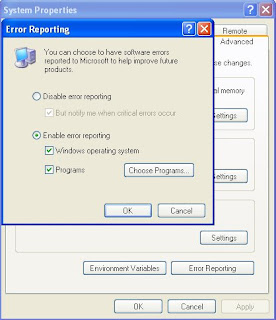
3) Click on Error Reporting. You will get the following dialog box :


4) Now to remove this feature completely, select Disable error reporting. And to use it selectively on certain programs only, click on Choose Programs... and add the required programs to the list.


Tushar (tushar1988@gmail.com)

Friday, August 15, 2008

Windows 7 Blog

A lot of people believe that Vista flopped because of the high amount of publicity that it garnered which resulted in unrealistic expectations. And people gave it the thumbs-down when it became clear that it didn't actually have as many features as the rather ill-informed web community consisting mainly of speculative bloggers had been promising.

So after the disappointment of the over-hyped Vista, Microsoft has decided to be a little more cautious in terms of the "information" it gives out about its next major launch  -- Windows 7. It has taken its pre-launch product communication in its own hands. And as part of this new policy, they have launched a blog dedicated to Windows 7 -- the Engineering Windows 7 blog, or E7 for short yesterday.

E7 is hosted by the two senior engineering managers for the Windows 7 product, Jon DeVaan and Steven Sinofsky. They want the blog to be "a two-way discussion about how we are making Windows 7". Their main aim is to provide an official platform where they can give out all the information they want to and only the information they want to give out. You can find the blog right here.

Tushar Bhatia (tushar1988@gmail.com)

Wednesday, August 6, 2008

5 Advantages of linux over Windows

This post is exclusively for my ECE friends

1. COST

2.SECURITY

3.CHOICE [Freedom] - With Linux, you have the power to control just about every aspect of the operating system.

4.HARDWARE - Linux is perfect for those old computers with barely any processing power or memory you have sitting in your garage or basement collecting dust.

5.SOFTWARE - the vast majority of Linux software is free and open source. Not only are you getting the software for no charge, but you have the option to modify the source code and add more features if you understand the programming language.


MOHIT YADAV